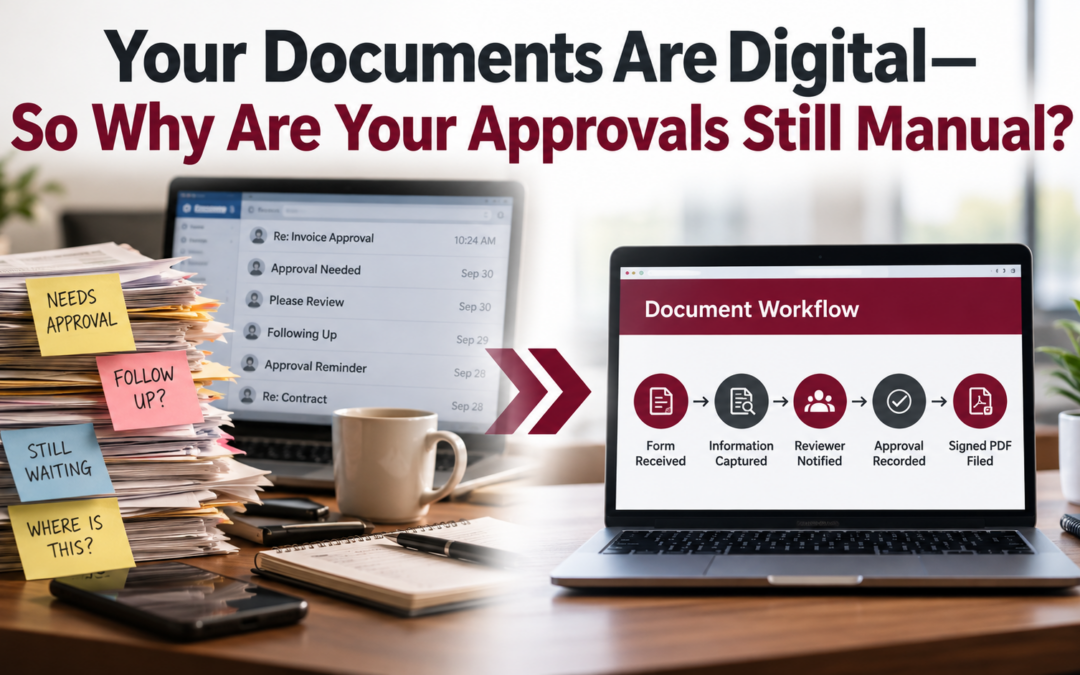
You’ve gone paperless. Your documents are stored electronically. But somehow, getting a simple approval still takes three emails, two reminders, and a phone call.
Sound familiar?
Many businesses have made significant progress toward digitizing their documents. They’ve replaced filing cabinets with shared drives, adopted electronic forms, and invested in multifunction printers that scan directly to cloud storage. Yet one important part of the process hasn’t changed: getting people to review, approve, sign, and move documents to the next step. That’s where document workflow automation can make a difference.
Going Paperless Is Only Half the Solution
Imagine your accounting department receives an invoice from a vendor. The invoice arrives electronically, so there’s no paper to scan. That should make things easier, right?
But here’s what happens next:
- An employee downloads the invoice and emails it to a manager.
- The manager is busy and doesn’t respond right away.
- Accounting follows up several days later.
- The manager approves the invoice, but the approval gets buried in an email thread.
- Someone manually updates a spreadsheet and saves the approved invoice in a shared folder.
The document was digital from the beginning. The process around it was still manual.
And the problem isn’t limited to accounting.
Human resources departments experience similar delays with time-off requests and employee onboarding. Sales teams wait for pricing and contract approvals. Schools process forms requiring multiple signatures. Manufacturing teams collect quality-control documentation that must be reviewed before production can continue.
In each case, the challenge isn’t necessarily getting information into a computer. It’s getting that information to the right person, at the right time, with a clear record of what happened next.
What Is Document Workflow Automation?
Document workflow automation connects the steps involved in processing business documents, from receiving information to reviewing, approving, signing, and filing it. Instead of relying on employees to remember who needs a document next, a workflow can automatically route information according to established business rules.
For example, an invoice approval process could look like this:
Form Received → Information Captured → Reviewer Notified → Approval Recorded → Signed PDF Filed
The appropriate employees still make the decisions. The technology helps organize the process and keeps it moving.
Depending on the solution and its configuration, document workflow automation can help businesses:
- Reduce repetitive data entry and manual follow-ups.
- Send approval requests to designated employees.
- Track the status of forms, invoices, and other documents.
- Record approvals and electronic signatures.
- Maintain a documented history of actions.
- Store completed documents in an organized location.
The result is a process that’s easier to manage, monitor, and improve.
Toshiba Introduces a New Way to Connect Documents and People
On October 5, 2026, Toshiba America Business Solutions announced UserConnect, a new add-on module for its Elevate Sky Workflow platform. Elevate Sky Workflow uses AI-powered technology to capture documents, extract relevant information, and route data through business processes. UserConnect extends those capabilities to activities that require human involvement, including reviews, decisions, approvals, and signatures.
According to Toshiba, the solution allows organizations to create forms and workflows using visual drag-and-drop tools, existing PDF documents, or AI-assisted setup. The platform is also designed to assign tasks, send information for review, track progress, collect electronic signatures, generate completed PDFs, and maintain an auditable record of workflow activities.
Why is this important?
Because automating a business process doesn’t mean removing people from important decisions. It means giving employees the information they need to make those decisions without unnecessary administrative work. A manager can still approve a purchase. A supervisor can still review a quality-control form. An administrator can still authorize a contract. The difference is that the process no longer has to depend entirely on email reminders, disconnected spreadsheets, and manual handoffs.
Where Could Workflow Automation Help Your Business?
You don’t need to be a large corporation to benefit from better document workflows.
Here are several everyday examples.
Accounting: Invoice and Purchase Approvals
Invoices can be routed to the appropriate manager for review based on predefined approval rules. Once approved, the completed record can be filed or passed to the next processing step. This can reduce time spent tracking down approvals and make outstanding requests easier to identify.
Human Resources: Employee Requests
Vacation requests, expense reimbursements, and onboarding forms often involve several people. Digital workflows can help route requests, collect required information, and provide a record of completed approvals.
Sales: Contracts and Pricing Decisions
When a salesperson requests special pricing, that request may require management authorization before a proposal can move forward. A structured workflow helps employees know where the request stands and who needs to act next.
Healthcare: Administrative Documentation
Patient intake paperwork and internal administrative forms may require review, signatures, or routing between departments. Automated workflows can help organize these steps, provided the solution is configured with appropriate privacy, security, and regulatory controls.
Education and Government: Forms and Authorizations
Purchase orders, administrative requests, employee forms, and other documents can require multiple levels of approval. A documented workflow can make responsibilities clearer and help departments locate completed records.
Manufacturing: Quality and Compliance Documentation
Manufacturers rely on inspection forms, quality-control records, and other documentation to support daily operations. Workflow automation can help route these records for review, track signoffs, and maintain documentation for future reference.
Still managing approvals through email? DDL can help you identify where your document processes slow down and explore ways to simplify them. Request a Document Workflow Review.
Three Signs Your Business May Need a Better Approval Process
Not sure whether workflow automation would make a meaningful difference?
Start by asking three questions:
1. Do employees regularly follow up on documents waiting for approval? If someone spends part of every week reminding others to review invoices, forms, or contracts, there’s probably an opportunity to improve the process.
2. Can you quickly determine where a document is in the approval process? If finding the answer requires searching emails or contacting multiple employees, better workflow visibility could help.
3. Are completed approvals stored consistently? When approvals live in email threads, spreadsheets, and shared folders, retrieving a complete record can become difficult.
You don’t necessarily need to automate every process. Often, improving one frequently used workflow is a practical place to start.
Better Document Management Starts with Understanding Your Workflow
At DDL Business Systems, we believe office technology should make everyday work easier—not introduce more steps. Since 1997, we’ve helped businesses throughout Winchester, Northern Virginia, the Shenandoah Valley, and surrounding communities find technology solutions that support the way they operate. As a Toshiba office technology provider, DDL can help organizations explore document management and workflow solutions, including where Toshiba’s technology may fit their needs.
Whether your business is managing invoices, processing forms, collecting signatures, or organizing records, the first step is understanding where work slows down. Which documents require approval? Who needs to review them? How are decisions recorded? And what happens after a document is signed? Answering those questions can reveal opportunities to simplify your processes without unnecessarily disrupting your employees’ work.
Ready to Move Beyond Going Paperless?
Your documents may already be digital. Now it’s time to consider whether the processes around them could work better.
Request a Document Workflow Review
DDL Business Systems can help you evaluate your current document processes, identify manual bottlenecks, and explore solutions that could make approvals, handoffs, and recordkeeping easier.
Contact DDL Business Systems to start the conversation.
Recent Comments