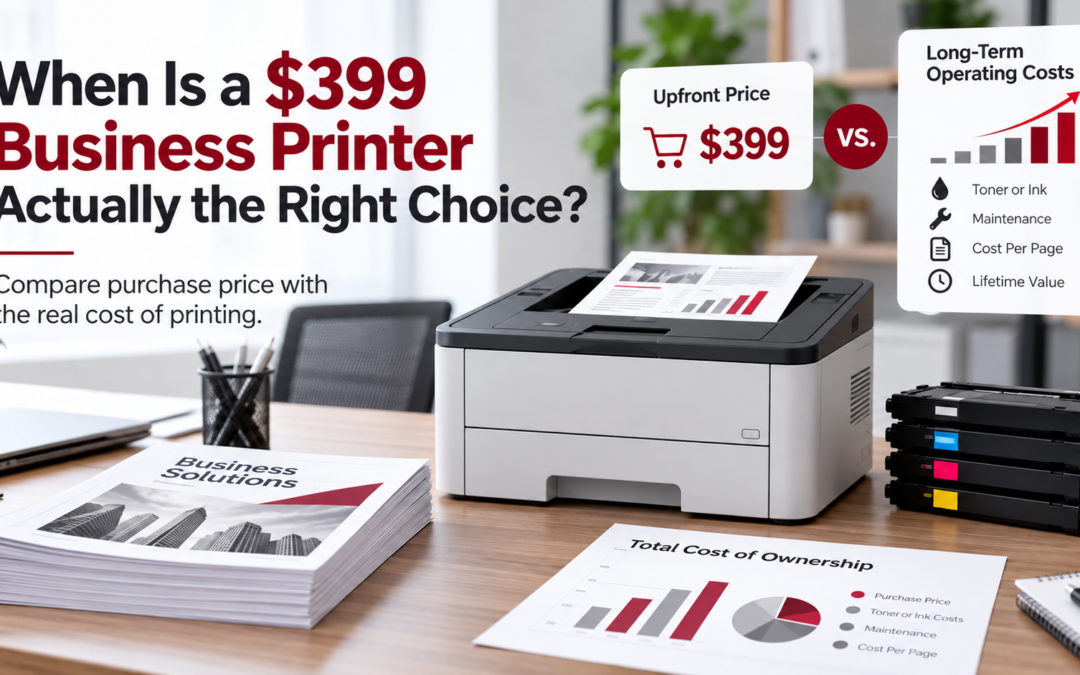
You need a printer for your business. You start shopping online, and there it is: a color printer for $399. It prints, copies, scans, and connects to your office Wi-Fi. Sounds like a pretty good deal, right?
Actually, it might be.
Not every business needs a large multifunction copier or an expensive printing system. For a small office with modest printing needs, a $399 printer could be exactly the right choice. But there’s a difference between what a printer costs to buy and what it costs to operate. Before you make that purchase, it’s worth asking a few questions about how your business will use the printer, how much you’ll spend on supplies, and what happens when something goes wrong. Let’s look at eight factors that can help you make a more informed decision.
1. How Much Does Your Business Actually Print?
One of the first things to consider is your monthly print volume. If you’re a small business printing occasional invoices, letters, or customer documents, a desktop printer may be perfectly adequate. For example, an office printing 200–300 pages per month probably has very different needs than one printing 3,000 pages. And the number of employees using the printer matters, too. A printer that works well for one or two people may become frustrating when six employees are waiting for documents throughout the day.
When a $399 printer makes sense: Your print volume is relatively low, jobs are occasional, and only a few employees share the device.
When to consider something more: Your team prints hundreds or thousands of pages regularly, handles large print jobs, or frequently experiences delays.
Helpful tip: Check the manufacturer’s recommended monthly print volume, not just its maximum monthly duty cycle. The maximum is not necessarily what the printer is designed to handle month after month.
2. How Often Do You Really Need Color?
Color printing is useful for presentations, marketing materials, charts, and customer-facing documents. But if most of your printing involves invoices, contracts, emails, or internal paperwork, you may not need color nearly as often as you think. That distinction matters because color supplies can significantly affect your overall printing expenses. For some businesses, an inexpensive color printer works well because they only print a handful of color pages each month. However, businesses regularly producing color-heavy documents may benefit from a device with a lower cost per page.
When a $399 printer makes sense: You need occasional color printing but don’t produce large quantities of color documents.
When to consider something more: You print brochures, proposals, presentations, or other color-intensive materials frequently.
The goal isn’t necessarily to eliminate color printing. It’s to make sure you’re not paying more than necessary to produce it.
3. What Will You Spend on Ink or Toner?
Here’s where an inexpensive printer can sometimes become an expensive one. The purchase price is only the beginning. Depending on the printer, replacement ink or toner cartridges can represent a substantial ongoing expense. Cartridge yield, page coverage, and the availability of high-capacity supplies all affect your cost.
A useful way to evaluate this is to calculate your cost per page. For example, let’s say you’re comparing two hypothetical printers:
- Printer A: Costs $399 and averages 8 cents per printed page in supplies.
- Printer B: Costs $1,200 and averages 3 cents per printed page in supplies.
If your business prints 2,000 pages each month, here’s how those costs could compare:
| Expense | Printer A | Printer B |
|---|---|---|
| Initial purchase | $399 | $1,200 |
| Monthly supply cost | $160 | $60 |
| Annual supply cost | $1,920 | $720 |
| Three-year purchase + supplies | $6,159 | $3,360 |
In this example, the printer with the higher purchase price could cost nearly $2,800 less over three years. Of course, actual costs vary by printer model, supplies, page coverage, maintenance, and usage. These numbers are illustrative, not quotes for specific products, and exclude paper, electricity, repairs, and service. The point is simple: a lower purchase price doesn’t always mean a lower total cost.
When a $399 printer makes sense: Your low printing volume keeps supply expenses manageable.
When to consider something more: You’re replacing cartridges frequently or spending more on supplies than expected.
4. Is the Paper Tray Large Enough?
Paper capacity might seem like a minor detail until someone has to refill the printer three times during a busy morning. Many desktop printers have smaller paper trays than larger office machines. That’s usually fine for a small office printing occasional documents. However, higher-volume environments may need larger trays, multiple paper sizes, or additional paper-handling options.
Consider how your office prints throughout the day.
- Do employees regularly print large packets?
- Does your team use letter and legal-size paper?
- Do you need envelopes or specialty media?
When a $399 printer makes sense: Standard paper capacity is sufficient, and refilling the tray occasionally isn’t disruptive.
When to consider something more: Your employees regularly interrupt their work to reload paper or switch between different paper types.
Sometimes the benefit of a larger printer isn’t simply printing faster. It’s allowing employees to spend less time managing the printer.
5. What Are Your Scanning Requirements?
Many affordable multifunction printers offer basic scanning capabilities, and for some businesses, that’s all they need. Scanning a signed form or a few pages occasionally? A basic flatbed scanner may work perfectly. But consider an office that scans 50-page contracts, insurance documents, patient records, or customer files on a regular basis. Suddenly, scanning speed, automatic document feeding, double-sided scanning, and document-routing options become much more important. Larger multifunction devices may also offer features such as searchable PDF creation, scan-to-email, scan-to-network folders, and document-management integrations.
When a $399 printer makes sense: You scan occasional documents and don’t require complex workflows.
When to consider something more: Your staff handles large document batches, needs automated scanning, or regularly moves scanned documents into business systems.
The right scanning capabilities can help employees work more efficiently and reduce manual document handling.
6. Is the Printer Secure on Your Business Network?
This is one area that businesses sometimes overlook. Modern printers aren’t just printing devices. They’re connected technology with software, network settings, and, depending on the model, the ability to store or transmit documents. That means even an inexpensive office printer needs to be configured properly.
Before connecting a new printer to your business network, consider whether it supports:
- Administrator password protection
- Firmware updates and ongoing manufacturer security support
- Secure network connections and printing protocols
- User access controls, where necessary
- Disabling unnecessary network features and services
- Secure handling of scanned documents
For businesses handling confidential customer information, financial records, or sensitive documents, additional security features may be important.
When a $399 printer makes sense: It provides the security capabilities your office needs, and someone is responsible for configuring and maintaining them.
When to consider something more: Your business requires stronger access controls, secure print release, detailed user permissions, or centralized device management.
Remember, even the best security features offer limited protection if nobody enables or maintains them.
7. What Happens When the Printer Breaks?
Imagine it’s Monday morning. Your team needs to print documents for an important customer meeting, but the printer won’t cooperate. Now what? With many lower-cost printers, you may be responsible for troubleshooting, contacting manufacturer support, arranging repairs, or purchasing a replacement. Depending on the warranty, device cost, and availability of parts, replacing the printer may be more practical than repairing it. For a small office with a backup printing option, that may not be a significant problem. But for a business that depends on reliable printing every day, downtime can disrupt operations. Larger business-class equipment may offer professional service arrangements, replacement parts, and ongoing maintenance support.
When a $399 printer makes sense: Printing isn’t mission-critical, and your business can tolerate occasional downtime or replace the device if needed.
When to consider something more: Printing is essential to daily operations, and you need predictable service and a plan for minimizing downtime.
The question isn’t just whether a printer might break. It’s how much disruption your business can afford when it does.
8. Should You Own the Printer or Consider Managed Print Services?
Buying a printer outright gives you direct ownership and control. You purchase the equipment, order supplies when needed, handle maintenance arrangements, and decide when to replace it. For small businesses with minimal printing needs, this straightforward approach may be ideal. However, as printing requirements grow, managing devices and supplies can become more time-consuming.
That’s where managed print services (MPS) may offer an advantage. Depending on your equipment and service agreement, managed print can provide:
- Printer fleet monitoring
- Automatic toner replenishment
- Usage and cost visibility
- Proactive maintenance and service support
- Recommendations to reduce unnecessary printing expenses
- Help managing multiple devices across your office
Rather than waiting until a printer runs out of toner or develops a problem, a managed approach can help businesses stay ahead of common disruptions. It’s important to compare the complete service agreement, including equipment, supplies, maintenance coverage, and any page-based charges. Managed print isn’t automatically cheaper for every business. But for offices with multiple printers, higher print volumes, or limited internal IT resources, the convenience and cost visibility can be valuable.
So, Is a $399 Business Printer a Good Investment?
It certainly can be. The best printer isn’t necessarily the least expensive or the most advanced. It’s the one that meets your actual business needs at a reasonable total cost.
Here’s a quick comparison:
| Business Need | $399 Desktop Printer | Business-Class or Managed Solution |
|---|---|---|
| Monthly volume | Typically better for lighter workloads | Often better for consistent, higher workloads |
| Color printing | Good for occasional use | May offer better economics for frequent color |
| Ink or toner | Depends on cartridge yield and usage | May offer lower per-page supply costs |
| Paper capacity | Usually smaller | Larger trays and expanded options |
| Scanning | Basic to moderate capabilities | More advanced document workflows |
| Network security | Varies by model and setup | May offer centralized controls and management |
| Repairs and service | Often owner-managed | Professional service options may be available |
| Ongoing management | Business handles supplies and maintenance | Managed support may reduce administrative work |
Features and costs vary by model and service agreement.
Before You Buy, Ask These Five Questions
Whether you’re purchasing your first office printer or replacing an older one, take a few minutes to consider:
- How many pages does our business print each month?
- What percentage of those pages actually need color?
- How much will replacement ink or toner cost over the next three years?
- What scanning, security, and networking capabilities do we need?
- What will we do if the printer stops working during a busy day?
Your answers can help determine whether a $399 printer is the economical choice or whether spending more upfront could reduce expenses and headaches later.
Let DDL Business Systems Help You Make the Right Comparison
At DDL Business Systems, we understand that every business has different printing requirements. A small professional office may only need a reliable desktop printer. Another business may benefit from a higher-capacity multifunction device or a managed print solution. Our goal isn’t to recommend the most expensive equipment. It’s to help you find the right fit for your workload, budget, and day-to-day operations.
Since 1997, DDL has helped businesses throughout Winchester, Northern Virginia, the Shenandoah Valley, and surrounding areas make informed office technology decisions. Whether you’re considering a small desktop printer, replacing an aging office copier, or reviewing your current printing expenses, our team can help you evaluate your options.
Before you purchase your next printer, ask for a Free Technology Assessment. DDL can help you compare the purchase price with the actual cost of operating the printer.
Recent Comments